

Planning a trip and worried about your phone bill? You’re not alone.
Using Travel Pass Verizon can save you money and keep you connected without the stress of unexpected charges. But how exactly do you use it? In this guide, you’ll discover simple steps to activate Travel Pass Verizon, understand how it works, and get the most value from it during your travels.
Keep reading—your next trip just got a whole lot easier.
Contents
Getting Started With Travelpass
Starting with TravelPass on Verizon is easy and quick. This service helps you use your phone abroad without extra hassle. Follow simple steps to activate and check your plan. Stay connected during your trips with no surprises.
Activating Travelpass On Your Device
First, open the My Verizon app on your phone. Tap the menu and select “TravelPass.” Choose the country you will visit. Pick the days you want to use TravelPass. Confirm your selection and activate the service. You will get a message when TravelPass is active. Make sure your phone is set to allow roaming.
Checking Eligibility And Coverage
Not all plans support TravelPass. Check your Verizon plan to see if TravelPass works for you. Visit the Verizon website or use the app to check. Look for your travel destination in the coverage list. Some countries may have limited or no coverage. Confirm coverage before you travel to avoid issues.

Credit: www.verizon.com
Using Travelpass Abroad
Using TravelPass abroad makes staying connected simple and clear. It lets you use your phone in many countries just like at home. No need to buy a new SIM card or change your plan. Your usual Verizon number works for calls, texts, and data.
Connecting To Networks
TravelPass works with local networks in over 185 countries. Your phone automatically finds the best network. You don’t need to change any settings. Just turn on your phone and wait for the signal. If the phone does not connect, restart it or check network settings.
Managing Data And Calls
TravelPass charges a daily fee for using data, calls, and texts. You can use your regular Verizon plan limits. Keep an eye on your data use to avoid running out. Calls and texts cost the same as at home. You can turn off data roaming to save money.
Avoiding Unexpected Charges
TravelPass helps avoid surprise bills by charging a clear daily rate. Turn off TravelPass if you don’t want to pay daily fees. Check your Verizon app to see daily usage and charges. Use Wi-Fi whenever possible to lower data use. Watch your phone for alerts about costs.
Travelpass Pricing And Plans
Verizon TravelPass offers a simple way to use your phone abroad. It lets you pay only for the days you use your phone outside the U.S. Understanding TravelPass pricing helps you control your travel costs. This section explains the daily fees and compares TravelPass with other Verizon plans.
Daily Fees And Billing
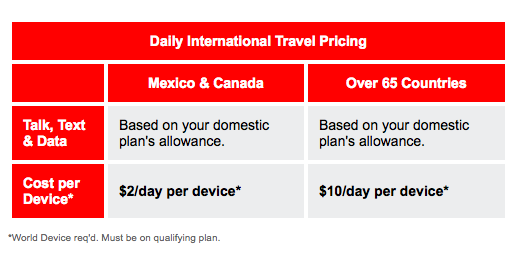
TravelPass charges a daily fee for each country you visit. The fee covers calls, texts, and data just like at home. You pay this fee only on the days you use your phone. If you don’t use your phone, you don’t pay the fee. The daily price usually ranges from $5 to $10. Some countries may have different rates. Verizon charges the fee once every 24 hours of use. This keeps your bill clear and simple. Your normal U.S. plan stays active. You keep your same phone number and plan features.
Comparing With Other Verizon Options
Verizon offers other plans for international travel. The monthly international plan lets you use your phone all month. It costs more but works better for long trips. TravelPass suits short trips with only a few days of use. Another option is the pay-as-you-go plan. It charges per call, text, and megabyte. This can get expensive fast. TravelPass offers better control and value. It combines your home plan with international use. This makes it easier to stay connected abroad.

Credit: www.youtube.com
Troubleshooting Common Issues
Travel Pass Verizon makes international travel easier. Sometimes, issues arise. These can stop your service from working well. Knowing how to fix common problems helps you stay connected. This section guides you through simple steps to solve usual troubles.
Resolving Connectivity Problems
Start by checking your phone’s settings. Turn on data roaming for Travel Pass to work. Restart your device to refresh the network connection. Look at your signal bars; weak signals cause slow service. Move to an open area to get better coverage. Clear your device’s cache to remove old data. Ensure your Travel Pass plan is active and paid. Update your phone’s software for the best performance. Reset network settings if problems continue. This often fixes connection errors.
Contacting Verizon Support
Contact Verizon support if issues remain after troubleshooting. Use the Verizon app for quick help. Call Verizon’s customer service for personal assistance. Explain your problem clearly and mention Travel Pass. Keep your account information ready for faster service. Ask about any outages or service changes. Request step-by-step help if needed. Use online chat for written support. Support teams work to restore your service fast.
Tips For Maximizing Travelpass
TravelPass by Verizon makes international travel easier. It lets you use your phone abroad like at home. To get the best from TravelPass, follow some simple tips. These help save money and avoid surprises on your bill. Planning and smart data use matter most.
Planning Ahead For International Travel
Check TravelPass coverage before your trip. Not all countries have the same plans. Activate TravelPass before leaving the U.S. This avoids delays or connection issues. Know the daily cost and limits for each country. Set a travel budget to control your expenses. Turn off apps that use data in the background. This prevents unwanted charges while traveling. Keep your phone charged and ready to use.
Using Wi-fi To Save Data
Wi-Fi helps reduce your TravelPass data use. Connect to Wi-Fi at hotels, cafes, and airports. Use Wi-Fi for calls, messages, and app updates. Turn off cellular data when on Wi-Fi. Download maps and guides before you go offline. Avoid streaming videos or music on cellular data. Save data for important tasks during travel. This stretches your TravelPass and lowers costs.
Credit: www.rvmobileinternet.com
Frequently Asked Questions
What Is Verizon Travelpass And How Does It Work?
Verizon TravelPass lets you use your phone abroad with your current plan. It charges a daily fee for calls, texts, and data in over 185 countries. You stay connected without buying local SIMs or changing your number.
How Do I Activate Travelpass On My Verizon Phone?
To activate TravelPass, log in to your Verizon account or use the My Verizon app. Select TravelPass for your destination country and confirm activation. It automatically starts when you use your phone abroad.
Which Countries Support Verizon Travelpass Service?
TravelPass covers more than 185 countries worldwide, including popular destinations in Europe, Asia, and Latin America. Check Verizon’s official list before traveling to ensure your destination is supported.
How Much Does Verizon Travelpass Cost Per Day?
TravelPass costs $10 per day in most countries. Some countries may have a different daily rate. You only pay on days you use your phone abroad, making it cost-effective for short trips.
Conclusion
Using Travel Pass Verizon keeps your phone connected while abroad. You pay a daily fee only on days you use your phone. This helps avoid big surprise bills after traveling. Just activate the service before leaving the U. S. And enjoy easy, reliable coverage.
Remember to check which countries are included in the plan. Keep track of your daily usage to stay within your budget. Travel Pass Verizon makes staying in touch simple and affordable during trips. Safe travels and happy calling!
