

Are you ready to make the most of your Travel Bank with United? If you’ve ever wondered how to use your Travel Bank balance to save on flights or manage your bookings, you’re in the right place.
Understanding how it works can unlock great deals and give you more control over your travel plans. Keep reading, and you’ll learn simple steps to use your Travel Bank like a pro—saving money and making your next trip easier than ever.
Contents
Setting Up Your Travel Bank Account
Setting up your Travel Bank account with United is simple and quick. This process lets you store credits for future flights easily. It helps keep your travel funds organized in one place.
The steps include creating an account, linking payment methods, and using the dashboard. These actions allow you to manage your travel money smoothly. Below is a clear guide to get started fast.
Creating An Account
Visit United’s official website to start. Click on “Sign Up” or “Create Account.” Enter your name, email, and a strong password. Confirm your email by clicking the link sent to you. This step secures your account and access to Travel Bank.
Linking Payment Methods
Log in to your new United account. Go to the Travel Bank section. Add your preferred payment method, such as a credit or debit card. This lets you add funds easily. Your payment details stay safe with United’s secure system.
Navigating The Travel Bank Dashboard
Once logged in, find the Travel Bank dashboard on your account page. Here, you can see your balance and transaction history. Use this dashboard to add funds or check credits. It’s simple to track and use your travel money.
Adding Funds To Travel Bank
Adding funds to your Travel Bank with United Airlines is simple. It helps you keep money ready for future trips. You can top up your Travel Bank anytime. This makes booking flights easy and fast. Let’s explore how to add money in different ways.
Methods To Deposit Money
You can add money using a credit or debit card. Just log in to your United account. Go to the Travel Bank section. Enter the amount you want to deposit. Confirm your payment details. The funds will show up quickly. Some people also use PayPal for deposits. Check which options are available in your country.
Using Credits And Vouchers
Credits and vouchers from United can go into your Travel Bank. These come from canceled flights or refunds. Instead of losing them, transfer these credits to your Travel Bank. This keeps your money safe for future use. You can apply these funds directly when booking. It saves time and avoids the hassle of tracking different credits.
Managing Multiple Currencies
United Travel Bank supports several currencies. If you travel internationally, you can add funds in your local money. The system converts it automatically. This helps avoid extra fees later. Always check your Travel Bank balance in your preferred currency. It keeps your spending clear and simple.
Booking Trips With Travel Bank
Booking trips with Travel Bank United is easy and convenient. It lets you use your Travel Bank balance to pay for flights. This way, you can save money and manage your travel budget better.
Below are simple steps and tips to help you use your Travel Bank during booking. Follow these to enjoy smooth payments and get the most value.
Applying Travel Bank Balance At Checkout
After selecting your flight, go to the payment page. Look for the option to use your Travel Bank balance. Enter the amount you want to apply. The system will reduce your total by that amount. You can use all or part of your balance. Confirm your payment to complete the booking.
Combining Travel Bank With Other Payments
You can pay with Travel Bank and a credit card. If your balance does not cover the full cost, choose another payment method. Split the payment between your Travel Bank and your card. This flexibility helps you book trips even with limited balance.
Tips For Maximizing Savings
Use your Travel Bank for expensive flights to save more. Check your balance before booking to plan payments. Try to combine Travel Bank with promotions for extra discounts. Book early to get better flight prices. Keep track of your Travel Bank expiration dates to avoid losing funds.
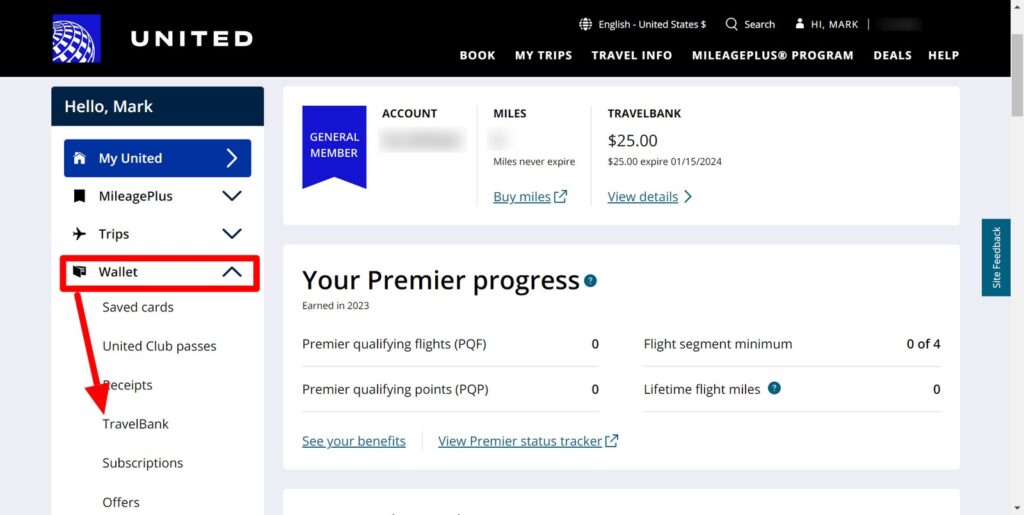
Credit: travel-on-points.com
Tracking And Managing Transactions
Tracking and managing your Travel Bank United transactions helps keep your travel budget clear. It makes sure you know how much credit you have and how you use it. Careful tracking avoids confusion and missed opportunities to save on flights.
Reviewing Past Payments
Check your Travel Bank account to see all past payments. Each transaction shows the amount used and the date. This helps you confirm that your credits were applied correctly. You can spot any mistakes quickly and save money.
Refunds And Adjustments
Refunds to your Travel Bank appear after canceled or changed flights. The system updates your balance automatically. Watch for any adjustments if the refund takes longer or the amount changes. Always verify your new balance after these updates.
Handling Expired Credits
Travel Bank credits expire after a set time. Check your account regularly to avoid losing money. Use your credits before the expiration date. If credits expire, you may lose their value, so plan your trips carefully.
Travel Bank Policies And Restrictions
The Travel Bank from United Airlines offers a convenient way to manage your flight credits. Understanding its policies and restrictions helps you use it effectively. This section explains important rules about expiration, transfer, and usage limits.
Expiration Dates
Travel Bank credits expire 12 months after issuance. The countdown starts from the date you receive the credit. Once expired, you cannot use the funds. Keep track of your credits to avoid losing them. Check your Travel Bank balance often to stay updated.
Non-transferable Rules
Travel Bank credits belong only to the original account holder. You cannot transfer or share them with others. Each credit links to the traveler who booked the ticket. Using credits for different people is not allowed. This rule keeps the system fair for all users.
Usage Limitations
You can use Travel Bank credits only for United Airlines flights. Applying credits to other services like baggage fees is not possible. Also, credits cannot cover taxes or fees separately. Use the full credit amount toward flight tickets only. Partial payments with credits may not be accepted.

Credit: smart.dhgate.com
Troubleshooting Common Issues
Using Travel Bank United should be simple. Sometimes, issues arise during payment or account use. These problems can slow travel plans or cause confusion. This section helps you fix common problems fast. Clear steps and tips make troubleshooting easy.
Resolving Payment Errors
Payment errors can happen for many reasons. Check if your card details are correct. Make sure your Travel Bank balance covers the payment. Try using a different browser or device. Clear your browser cache and cookies to avoid glitches. If the error stays, wait 10 minutes and try again. This often solves temporary issues.
Contacting Support
Customer support helps when you cannot fix problems alone. Use the Travel Bank United website to find contact options. You can call, email, or chat with a support agent. Provide your booking details and error messages for faster help. Keep your account information ready. Support teams usually reply within 24 hours.
Frequently Asked Questions
Many users share similar questions. Can I transfer my Travel Bank balance? How long does my balance last? What happens if I cancel a trip? Find answers on the official FAQ page. It saves time and helps you understand Travel Bank rules. Check the FAQ before contacting support.

Credit: loyaltylobby.com
Frequently Asked Questions
What Is Travel Bank United And How Does It Work?
Travel Bank United is a digital wallet for United Airlines travelers. It stores credits from canceled flights or refunds. Users can redeem these credits for future bookings, upgrades, or other travel expenses within United Airlines.
How Do I Redeem Travel Bank Credits On United Airlines?
To redeem Travel Bank credits, log in to your United account during booking. Apply the available Travel Bank balance at checkout. The credits will reduce your total payment immediately, making it easy and seamless to use.
Can I Transfer My Travel Bank Balance To Someone Else?
No, Travel Bank balances are non-transferable. The credits are tied to the original traveler’s account. Only the account holder can use the Travel Bank funds for United Airlines bookings.
How Long Are Travel Bank Credits Valid For?
Travel Bank credits typically expire 12 months from the issue date. It’s important to use them before expiration to avoid losing the value. Check your account for exact expiry details.
Conclusion
Travel Bank United helps you manage your travel funds easily. You can save money for future trips without stress. Using it lets you book flights and hotels quickly. Keep track of your balance to avoid surprises. Always check the terms before spending your credits.
Travel Bank makes planning trips simpler and smoother. Try it to enjoy more control over your travel budget. Your next trip could be just a few clicks away. Simple, smart, and easy to use—Travel Bank fits your needs.
